Instagram First Draft Review: Quick Reels Editing for Beginners
Instagram's First Draft turns selected clips into a basic Reel edit automatically. Here's who it helps and where it falls short.
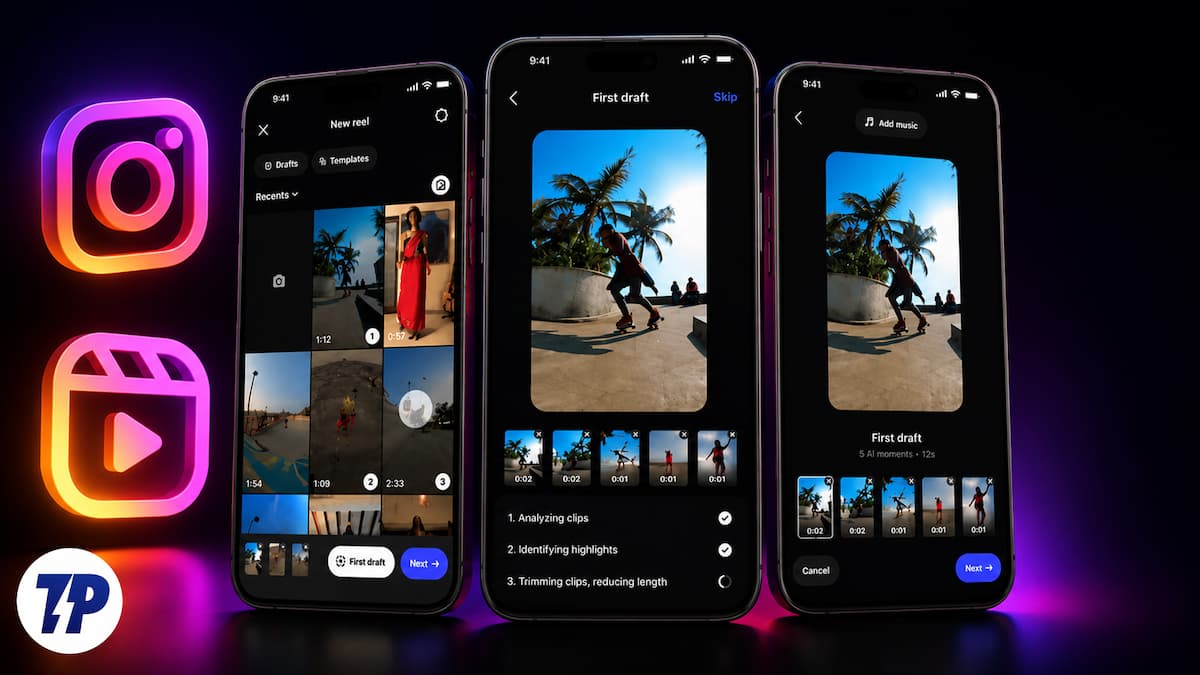
Instagram has just rolled out a new feature, which it claims is going to make creating Reels easier. As its name suggests, First Draft basically gives users a quick “first draft” by turning all the video clips that they have selected into a quick Reel. The feature is an iPhone exclusive for now and only available on the main Instagram app, and not on Edits (the Reels editing app by Instagram), but an Android release is likely to follow soon.

Given all the AI hype and how much Meta is focusing on it, you might think First Draft is a new AI feature, but Instagram has confirmed that First Draft does not use Artificial Intelligence. Nevertheless, it has made people wonder if its ease of use could actually reduce the role of conventional, “manual” editing in the Reel world. We have used the feature for a short while, and here is what we think.
How to Use Instagram First Draft
Using First Draft is a pretty simple affair. Just follow these steps:
- Open the Instagram app on your iPhone (do remember to update it to the latest version), then tap on the ”+” icon present on the top left side of the app to add new content.
- From there, swipe to Reels on the panel on the lower part of the app.

- Tap on the camera to record footage or select an existing video from your gallery, which will be displayed.
- Once you have selected all the clips you wish to add, look for the First Draft option, which will appear on the panel at the lower part of the app — it appears the moment you select a video. Tapping it will open a First Draft box, with a “Try it” button. Tap on this button.

- Hitting the button puts the selected videos into a processing phase where the app analyses the clips, identifies highlights, trims clips, and reduces the length.

- In a matter of ten seconds, the feature will present a pretty basic edited version of your videos, trimming them and cutting out awkward pauses, with preview frames beneath the result, which you can move back and forth to reorder.
- If you like the results, tap on the Next button in the bottom right corner of the app to go to the Instagram Reels posting page (you can also take your results to Edits), make more changes if need be, and hit Publish.

How First Draft Works
Instagram has stressed that the new editing feature is just a “starting point” on which creators can then build their final Reel. The platform says the feature can identify silences, awkward pauses, and other such moments. It then removes these moments, trims the video, and gives a first draft that highlights what it assumes are important parts of the video. It allows creators to select or record, edit, and share all without leaving Instagram.
Instagram has been ensuring that users know that all that is done by the feature is reversible, and does not come as an attempt to replace a creator’s creativity, but actually offers early video trimming so users can move their focus from the technical part of editing to its creative part. Instead of using AI (which comes as a surprise), First Draft actually uses internal processing and audio detection to find moments of silence in selected videos. We have fiddled with the feature for a short while and can say that it actually works, serving up a very basic edit of videos (or of a single long video), even while leaving the “creative work” to the user.
Going by our first encounter with First Draft, it cannot really replace manual editing. It is not a very creative feature and only offers what can be termed as the bare-bones of what your edited Reel might look like. We found the feature does eliminate pauses and silence, but when it trims videos, there seems to be no method to its madness, which basically means you can end up with some of the important bits removed from the video. In its current form, it might come in handy for people who create piece-to-camera video formats, but you would still need to revise and re-edit the whole thing on your own.
First Draft: Who Is It For (and Who Might Not Like It)
It is rather basic, but those who are new to creating videos and struggle with editing might find First Draft useful. It offers a very quick, hassle-free edit of videos. This can be helpful for creators who are not as skilled when it comes to editing their content, or are intimidated by the task. First Draft can be a very simple, quick-fix solution for them. But it is unlikely to appeal much to those creators who have been in the game for a while, are good at editing, and have their own style and flair in the editing field.
But given that a large number of Instagram users do not really know much about video editing, First Draft seems to be an extremely handy tool, especially for those who do not want to get into the hassle of going through all their videos one by one and trimming out stutters and pauses. The fact that one can do so right from within Instagram, without having to open an additional app, is a huge bonus. As mentioned by the platform itself, First Draft is just a starting point and nothing more. Even in its current form, it will help new creators start their content journey and feel more comfortable without getting knee-deep in editing hassles from the get-go.
Experts might shake their heads at how basic the feature is, but then remember how DSLR photographers shook their heads at 0.3 MP cellphone cameras? First Draft might be the first step to breaking down the editing barrier that holds back many content creators, and if it gets better — with options to automatically choose background audio or add subtitles in other languages, for example — even experts might find it a handy tool to save them some time. For now, though, First Draft is mainly for Instagram newcomers who want Reel creation with zero hassles, and that is actually a bigger deal than some of the pros might admit.